Fyorin > Resources > Blog >
Manual Reconciliation vs Accounts Receivable
Accounts Receivable
Accounting
Technology
By
Karolina Jarosinska
|August 20, 2024
While the benefits of automating accounts payable are gaining significant recognition among finance professionals, with over 54% of companies worldwide now reporting using an automated accounts payable system as at least part of their workflow, accounts receivable is still a vastly overlooked process. An account receivable is a legally enforceable claim for payment held by a business for goods supplied and/or services rendered that customers have ordered but not yet paid for. It’s been reported that only 36% of medium-sized enterprises nowadays automate some or all of their receivables; however, a staggering 1 in 5 companies still rely on a manual process. Since receivables directly link to revenue, an inefficient, inaccurate, and error-prone process can lead to profit loss and cash flow issues further down the line and is not something that should be overlooked. While not as widely popular among tech vendors and fintechs, receivables is a key financial process that can be automated beyond just syncing your bank statements (known as bank feeds) to your accounting tool; it can be a fully touchless process from start to finish. But how does it work?
Before diving into the intricacies of automated receivables, let’s take a minute to understand the cumbersome process of manually reconciling accounts receivable and the many steps it involves - at each step, something can go wrong, making manual handling incredibly inefficient and error-prone.

This process is usually repeated on a monthly basis and can take around 40 hours in a medium-sized business, and can take even longer if major issues or discrepancies are found. Bear in mind too that as your business grows and you acquire new customers, especially when scaling overseas and you start receiving revenue in multiple currencies to different accounts, the complexity increases, so the time will inevitably increase as well. At this stage, dealing with receivables at month’s end may take over a full working week that could have been better spent on strategic activities such as forecasting, planning, and further expansion.
With automated receivables, the process is handled automatically from start to finish. The first step is to integrate your receivables tool with your accounting platform - match your customer and account details, and from there, the process does not require manual intervention. The accounts receivable process includes stages such as customer onboarding, invoicing, and collections, ensuring timely payments and maintaining healthy cash flow. Here’s how it works step by step:
Without a doubt, there will be occasional situations that will require manual intervention, such as applying a special discount, processing a refund, dealing with issues related to duplicate invoices, or back-and-forth with clients who have not paid for an extended period. Nonetheless, even with those exceptional cases, an automated receivables process can save you around 40% of manual work - this is down from 40 hours a month to 24 hours a month!
Apart from time savings, automated receivables bring some additional benefits. The benefits of automated accounts receivable include:
Our comprehensive financial operations and payments platform empowers finance teams and professionals to take charge of their day-to-day tasks by automating receivables and focusing on strategy and growth. Fyorin offers a complete suite of accounting and finance automations from accounts payable, expense management, and now also receivables that integrate seamlessly with major accounting tools and ERPs such as Sage, Microsoft Dynamics, Netsuite, Xero, QuickBooks, and Zoho Books.
Fyorin's automated accounts receivable let you:
Ready to streamline your receivables? Register with us by emailing [email protected] or book a demo.
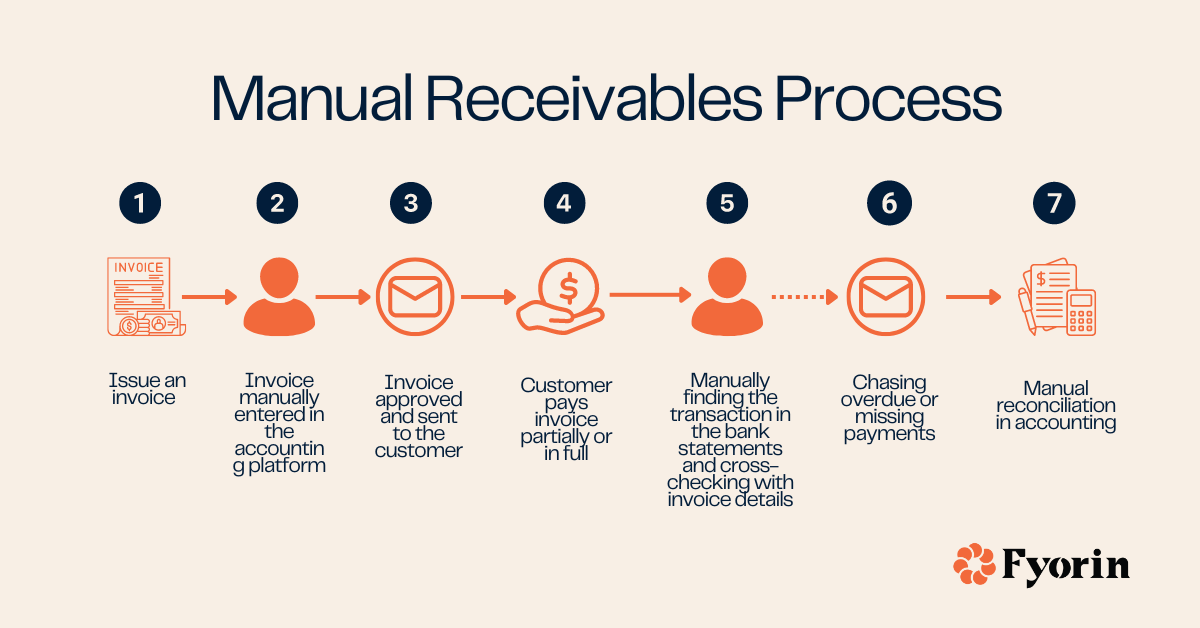
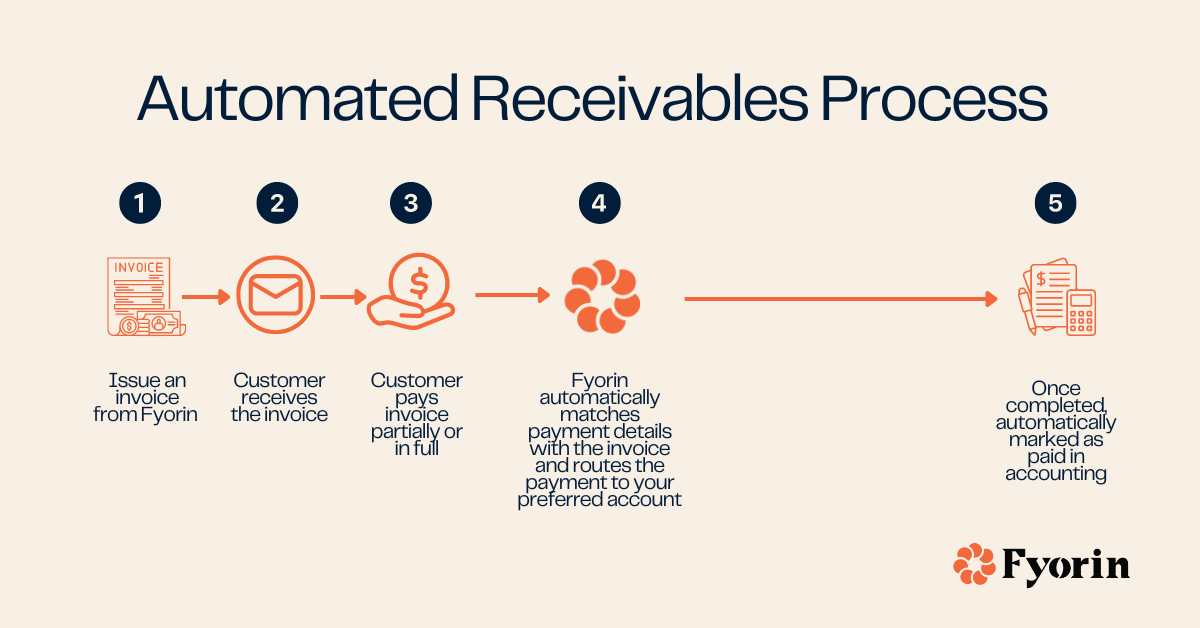
Fyorin’s Automated Payables allow you to:
Ready to streamline your payables at global scale? Register with us by emailing [email protected] or book a demo.
Doing accounts receivable means tracking and managing money owed to your business by customers and clients for goods or services provided on credit. The process includes issuing invoices, recording payments, and looking after a timely collection of outstanding balances.
In accounts receivable, the three main stages of reconciliation are:
1) Comparing internal records (receivables ledger, invoices) with external statements (usually bank statements)
2) Identifying and investigating discrepancies (open invoices, payments received)
3) Making necessary adjustments to align the accounts.
This process ensures that recorded receivables match the incoming payments.
The main difference between manual reconciliation and automated reconciliation is the time spent and susceptibility to errors. Manual reconciliation involves human intervention when matching invoices to payments and updating records, while with automated reconciliation all is done automatically and in real-time.
Fyorin, a financial operations platform for digital businesses, automates and monetizes the movement of money, making financial operations smoother, faster and more efficient. The platform eliminates 90% of manual work, allowing businesses to connect with their preferred accounting platform to automate receivables and payables.